Authentication
Apihub provides no anonymous access except some dedicated endpoints like shared document or it’s own OpenAPI spec. User authentication is primarily handled through external Identity Providers (IDPs), making Single Sign-On (SSO) the preferred authentication method. The system also supports local authentication (disabled in production mode) for development purposes.
JWT-based Authentication
Section titled “JWT-based Authentication”Apihub provides two JWT-based authentication approaches:
1. HttpOnly Cookie Authentication
Section titled “1. HttpOnly Cookie Authentication”An approach that stores tokens in HTTP-only cookies for enhanced security.
Key characteristics:
- Tokens stored in HttpOnly cookies:
apihub_access_tokenandapihub_refresh_token - Enhanced protection against XSS attacks through HttpOnly flag
- Seamless user experience with automatic token refresh mechanism
2. Bearer Token Authentication
Section titled “2. Bearer Token Authentication”An approach that uses standard Authorization: Bearer <token> header.
Key characteristics:
- Simple integration with standard API tools and libraries
- Suitable for scenarios where cookie-based auth is not preferred
- Manual token refresh required
- Requires additional security considerations for XSS protection
Token configuration
Section titled “Token configuration”You can configure token lifetimes using these configuration properties:
security.jwt.accessTokenDurationSec # Access token duration in seconds (default: 30 minutes)security.jwt.refreshTokenDurationSec # Refresh token duration in seconds (default: 12 hours)Automatic token refresh
Section titled “Automatic token refresh”The system will automatically refresh your access token if:
- The current access token expired.
- You have a valid refresh token.
- You make a request to login endpoint(
/api/v1/login/sso/{idpId}) withapihub_refresh_tokencookie.
Note: automatic token refresh is only available when using HttpOnly cookie authentication. If you’re using Bearer token authentication, you’ll need to issue a new access token manually.
External Identity Providers
Section titled “External Identity Providers”Apihub supports multiple external identity providers (IDPs) simultaneously, enabling flexible authentication strategies.
Supported protocols
Section titled “Supported protocols”- SAML (tested with ADFS and Keycloak).
- OpenID Connect (OIDC) (tested with Keycloak).
Each IDP can be configured independently with its own parameter set. The system allows for:
- Multiple IDPs running simultaneously.
- Different protocols (SAML/OIDC) working in parallel.
In the result of successful IDP auth, a user is synced to Apihub DB and auth tokens are generated:
- Access token with a configurable lifetime.
- Refresh token for automatic token renewal.
- All tokens are stored in HttpOnly cookies for enhanced security.
Note: Apihub uses external authentication, but issues its own auth tokens stored in HttpOnly cookies.
The access token is used for authentication/authorization and should be passed in apihub_access_token cookie for any API calls.
Library https://github.com/shaj13/go-guardian is used on the backend to issue and check JWT tokens.
SSO via SAML
Section titled “SSO via SAML”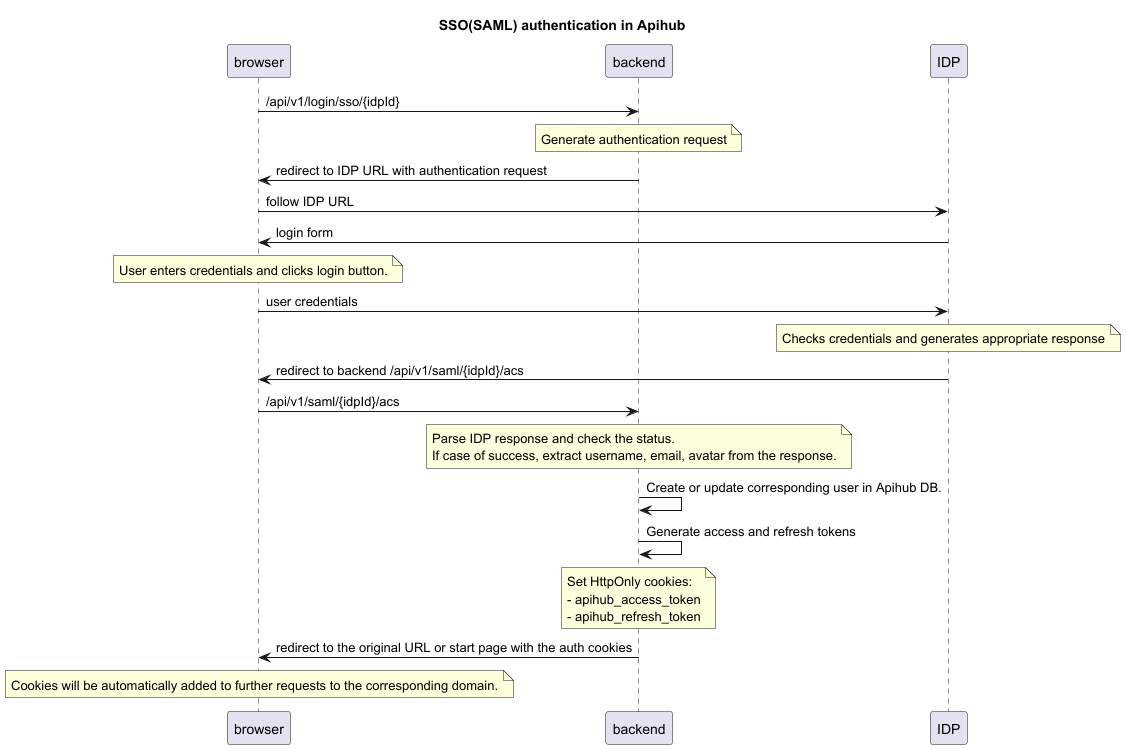
Notes:
- Attributes “User-Principal-Name”, “http://schemas.xmlsoap.org/ws/2005/05/identity/claims/emailaddress” are mandatory in SAML response
- Attributes “http://schemas.xmlsoap.org/ws/2005/05/identity/claims/givenname”, “http://schemas.xmlsoap.org/ws/2005/05/identity/claims/surname”, “thumbnailPhoto” are not mandatory but expected in SAML response to fill the user profile
- When setting up the SAML client in your Identity Provider, please note that Apihub uses a parameterized metadata endpoint
/api/v1/saml/{idpId}/metadata
SSO via OIDC
Section titled “SSO via OIDC”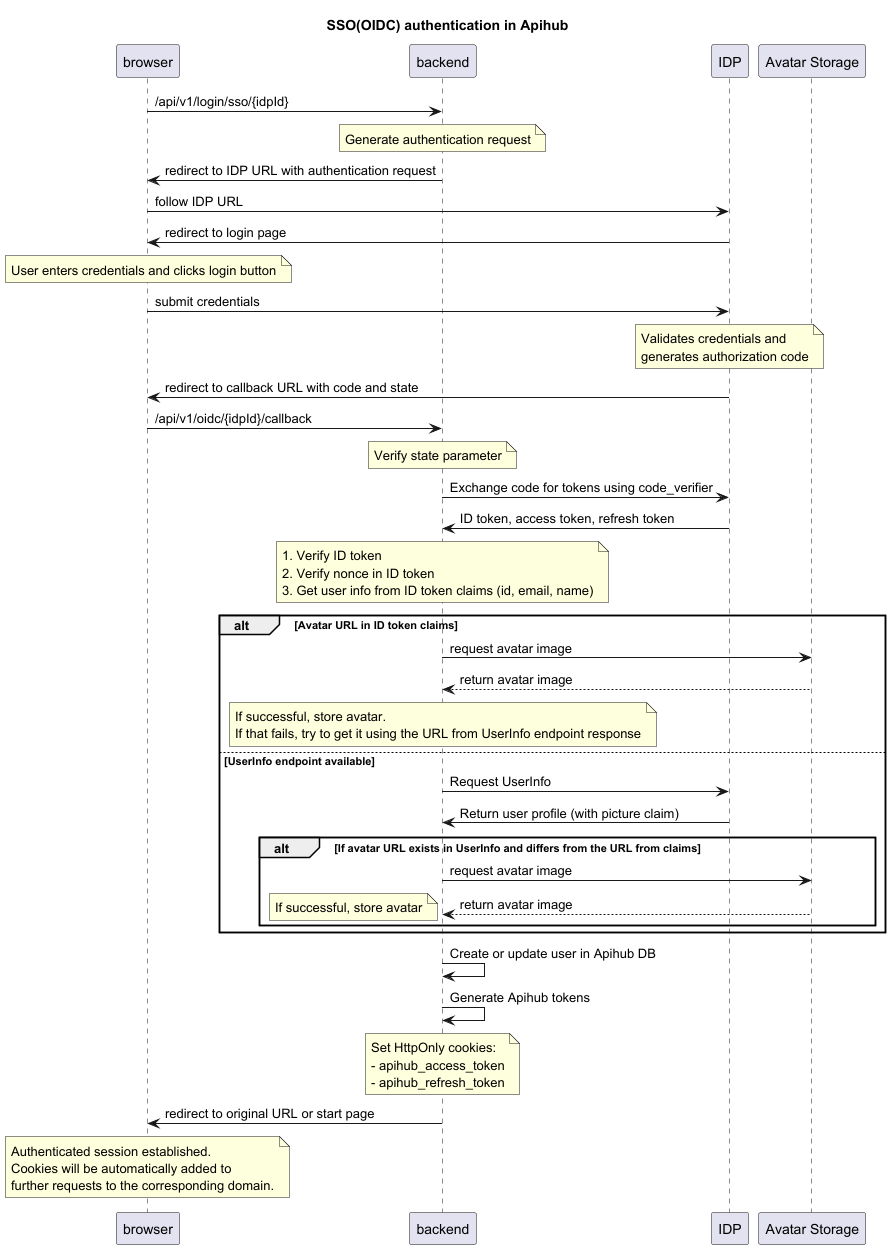
Notes:
- The implementation uses the Authorization Code Flow with the following security measures:
- State parameter to prevent CSRF attacks.
- Nonce parameter to prevent replay attacks.
- PKCE (Proof Key for Code Exchange) to prevent authorization code interception.
- Strict redirect URI validation.
- Client scopes
openid,profile,emailare mandatory. - Claims
subandemailare mandatory in ID token. - Claims
nameandpictureare not mandatory but expected in ID token to fill the user profile.
Internal(local) user management
Section titled “Internal(local) user management”Apihub supports local user management, but this functionality is disabled in production.
(Production mode is configured via security.productionMode configuration property, false by default)
There’s no registration page, but it’s possible to create local user via API. Local login is supported via UI page(“/login”) and dedicated endpoint (“/api/v2/auth/local”).
API keys
Section titled “API keys”API key is another auth method intended for some automation. Despite API key have “created by” and “created for” relations with users, it acts like a separate entity. E.g. if some version was published with API key, it’s “created by” property will point to the key, not to user.
API key is bound to workspace/group/package/dashboard (see Data entities chapter), so it limit’s the scope of the key.
However, system API keys exist as well, but it could be issued only by system administrators.
Personal Access Tokens
Section titled “Personal Access Tokens”PAT is equals to the bearer token when we talk about the permissions and user representation, but it have different properties in terms of TTL. Lifetime is configurable on creation and could be unlimited.
PAT is intended for personal automation, for example for Qubership APIHUB VS Code extension ( https://github.com/Netcracker/qubership-apihub-vscode ).
It’s possible to delete a token.
There’s a limit for 100 PAT per user in the system.
Authorization
Section titled “Authorization”Data entities
Section titled “Data entities”First of all let’s define some terms/entities used in the following description. ‘Workspace’ is a top grouping entity which may contain groups, packages, dashboards. ‘Group’ is a grouping entity for a list of packages. ‘Package’ is a representation of a service with API. ‘Dashboard’ is representation for a set of particulate versions of services, i.e. it’s like deployment.
Roles and permissions
Section titled “Roles and permissions”Apihub have built-in authorization model which is based on granted roles for workspace/group/package/dashboard and system roles.
flowchart LR
 subgraph role1["Package role A"]
    direction RL
        permission_1_1["permission 1"]
        permission_1_2["permission 2"]
  end
 subgraph role2["Package role B"]
    direction RL
        permission_2_1["permission 1"]
        permission_2_3["permission 3"]
  end
 subgraph system_role["System role"]
    direction BT
  end
 subgraph roles["Roles"]
    direction RL
        role1
        role2
        system_role
  end
    user["User"] --> roles
    role1 --> package_1["package/group/dashboard/workspace X"]
    role2 --> package_1
    system_role --> package_1 & package_2["package/group/dashboard/workspace *"] & system_actions["system actions"]
User have a set of roles for particular entity.
Role have a set of permissions.
Roles are defined system-wide by system administrators.
Roles have a hierarchy which limits privilege escalation.
Permission in required to execute some action like view content, publish version, create package, etc.
Workspace/group/package/dashboard have a default role that is assigned to a user which have no granted role. Default role for most entities is “Viewer”, i.e. read only access.
Permissions
Section titled “Permissions”Permissions are hardcoded, i.e. it’s not possible to modify permissions list via configuration.
Available permissions:
- read content of public packages
- create, update group/package
- delete group/package
- manage version in draft status
- manage version in release status
- user access management
- access token management
Role management
Section titled “Role management”Built-in roles:
- Viewer - read only role
- Editor - role with an ability to publish new version
- Owner - role with full ability to manage the entity, but without access configuration
- Admin - full access to the entity
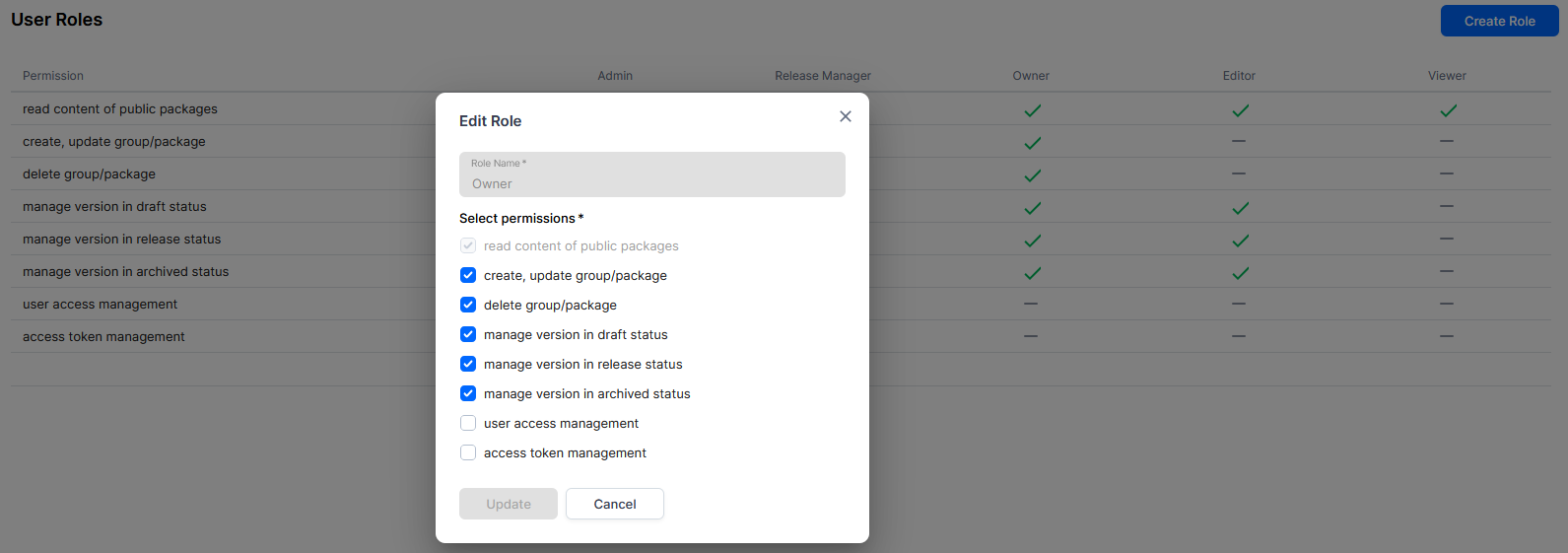
It’s possible to create a new custom role with any set of permissions(but read permission is mandatory).
Example:
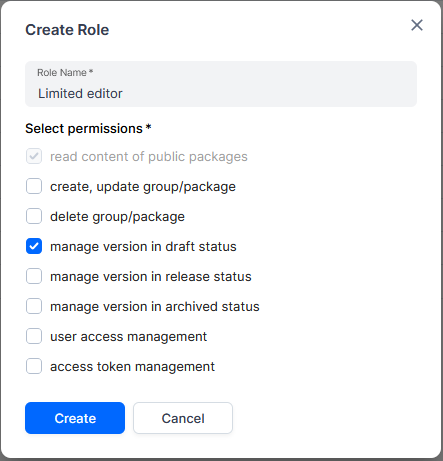
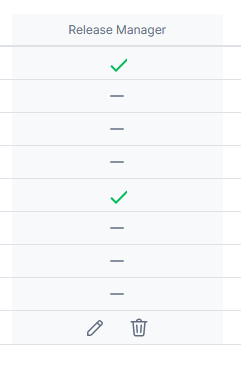
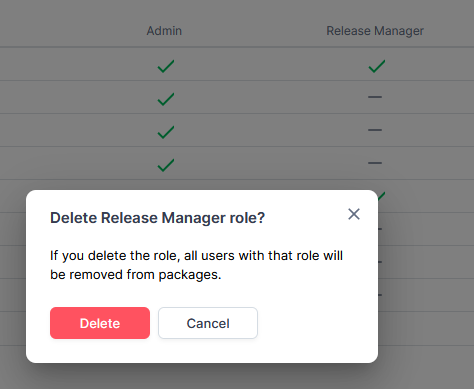
It’s possible to edit or delete roles other than “Admin” and “Viewer”:
Permissions configuration
Section titled “Permissions configuration”Default permissions configuration:
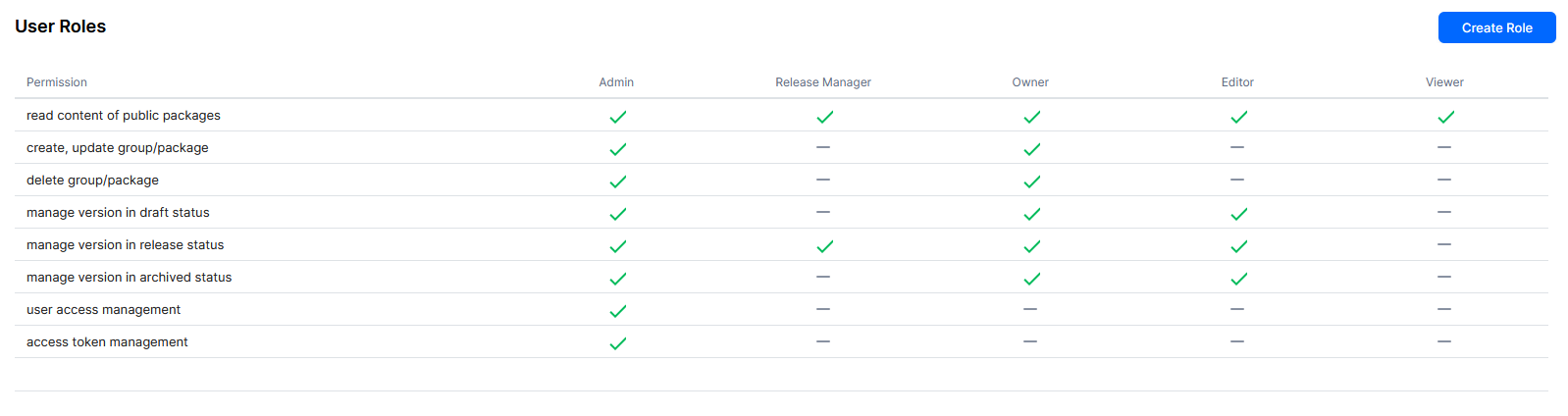
The roles configuration provides flexibility to create required roles with required set of permissions.
Roles inheritance
Section titled “Roles inheritance”The assigned roles are inherited in the Workspace/group tree in a hierarchy approach approach.
I.e. nested entities inherit access control configuration from the parents, but can add extra roles.
Inherited roles can’t be revoked down the hierarchy.
So the final set of roles for a particular package/dashboard a calculated as as sum of roles in the parent groups and workspace plus package/dashboard roles.
Example
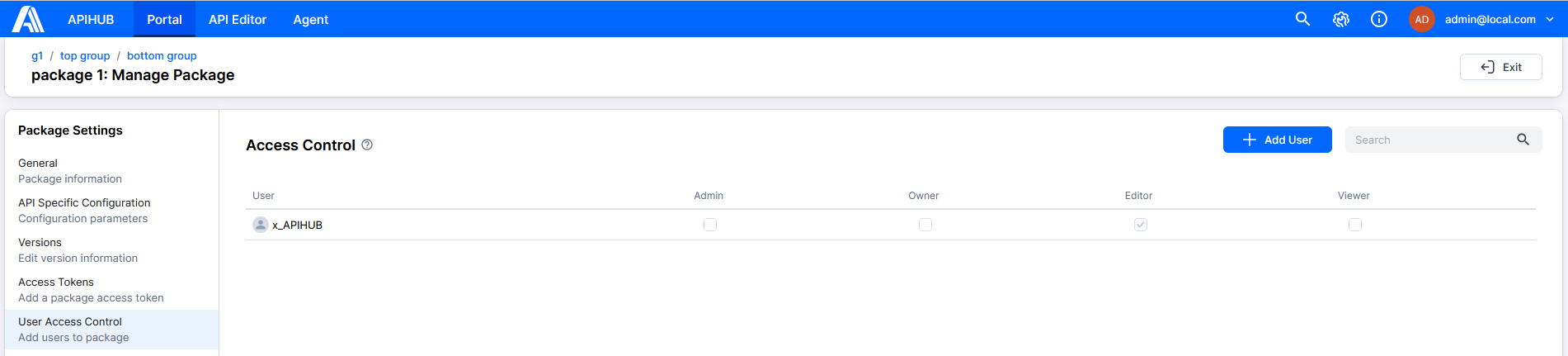
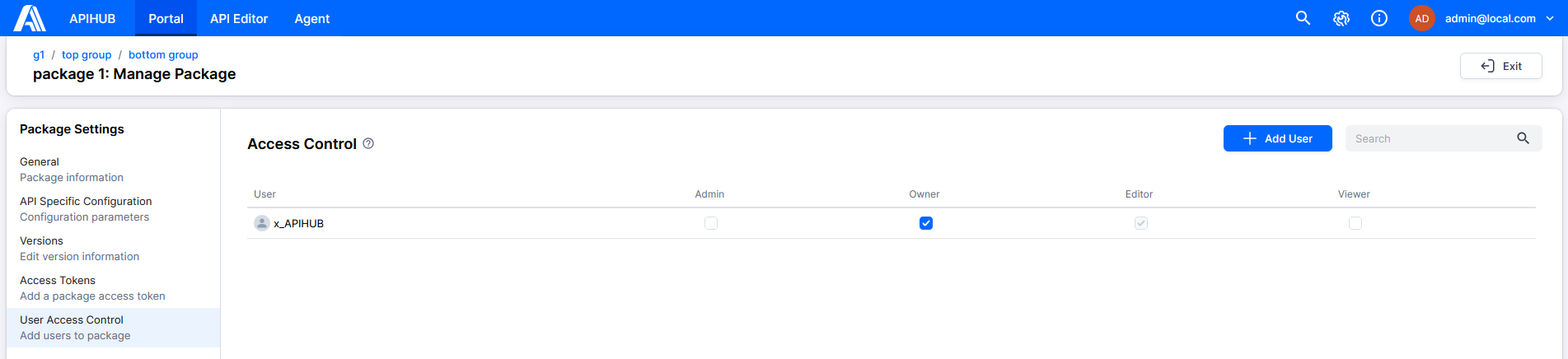
Section titled “Example”Package tree contains the following hierarchy: “g1”(workspace) -> “top group” -> “bottom group” -> “package 1”
In workspace “g1” user “x_APIHUB” have no role assigned, so default role “Viewer” is used.
“x_APIHUB” is added to the “top group” as editor.

The user access is inherited in the “bottom group” and “package 1”:

Add role “Owner” for the specific package:
Roles hierarchy
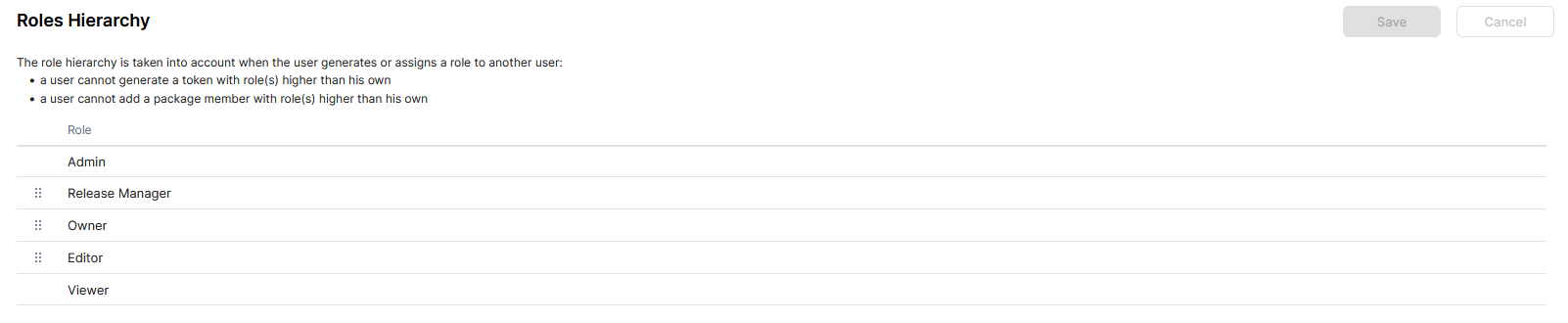
Section titled “Roles hierarchy”The roles have an hierarchy which is used in access management. User may not assign a role higher than his own. (It’s not used in default hierarchy)
Default roles Hierarchy:
Example
Section titled “Example”- Create a role “Gatekeeper” with permission to manage user access only. Move it to the top of hierarchy.
- Add permission to manage roles to role “Editor”.
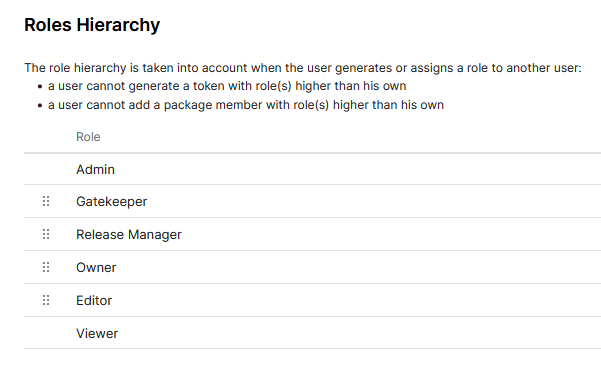
In this case only “Admin” can add users with “Gatekeeper” role.
“Gatekeeper” user is able to set to users any roles other than “Admin”.
“Editor” is able to set only “Editor” and “Viewer” roles.
And all this logic is applied to package tree
System roles
Section titled “System roles”Apihub have a concept of system role - a role which is not bound/limited to workspace/group/package/dashboard entities and works system-wide. Currently the only built-in system role is “system administrator”.
It gives:
- access to all packages with maximum permissions
- access to admin-only actions
Entity visibility(privacy)
Section titled “Entity visibility(privacy)”Workspace/group/package/dashboard invisibility(privacy) is implemented via missing read permission.
System have built-in role “none” which have no permissions at all.
So if the workspace/group/package/dashboard need to be private - the default role should be “none”
In UI it’s managed by a “Private” checkbox:
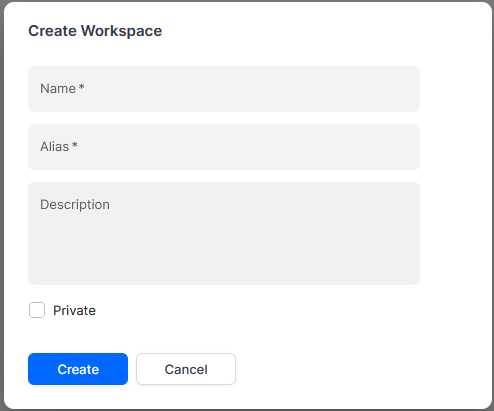
In this case any user which have no granted roles for the entity, will not be able to see/retrieve it. It’s managed on the API level.
Global search enforces the same read permission via on-demand package visibility and invisibility root lists joined into search queries against global_search.fts_* (workspace-partitioned indexes). Legacy public.fts_* tables remain dual-written and are deprecated for search reads.
Personal private workspaces (defaultRole: none) are indexed for search. Authorised principals can find content there through the visibility roots; users without read do not. The separate excludeFromSearch flag still omits a workspace (and its children) from the search index when set, but personal private workspaces no longer default to that flag.