DI-Portal-GF-004 Create Package
Design Item ID: DI-Portal-GF-004
Design Item Name: Create Package
Related Design Items: -
Related API:
- Create a new package (POST /api/v2/packages)
- Get packages list (GET /api/v2/packages)
Revision History:
| Date | Description |
|---|---|
Description
Section titled “Description”The functionality provides user with the ability to create package.
Package is package with kind = package. Package is versioning entity that can contain API documentation. Package can be
created under workspace or group.
Start Point
Section titled “Start Point”- User navigates to APIHUB Portal → workspace, or
- User navigates to APIHUB Portal → workspace → group
Execution
Section titled “Execution”- User clicks Create → Package button.
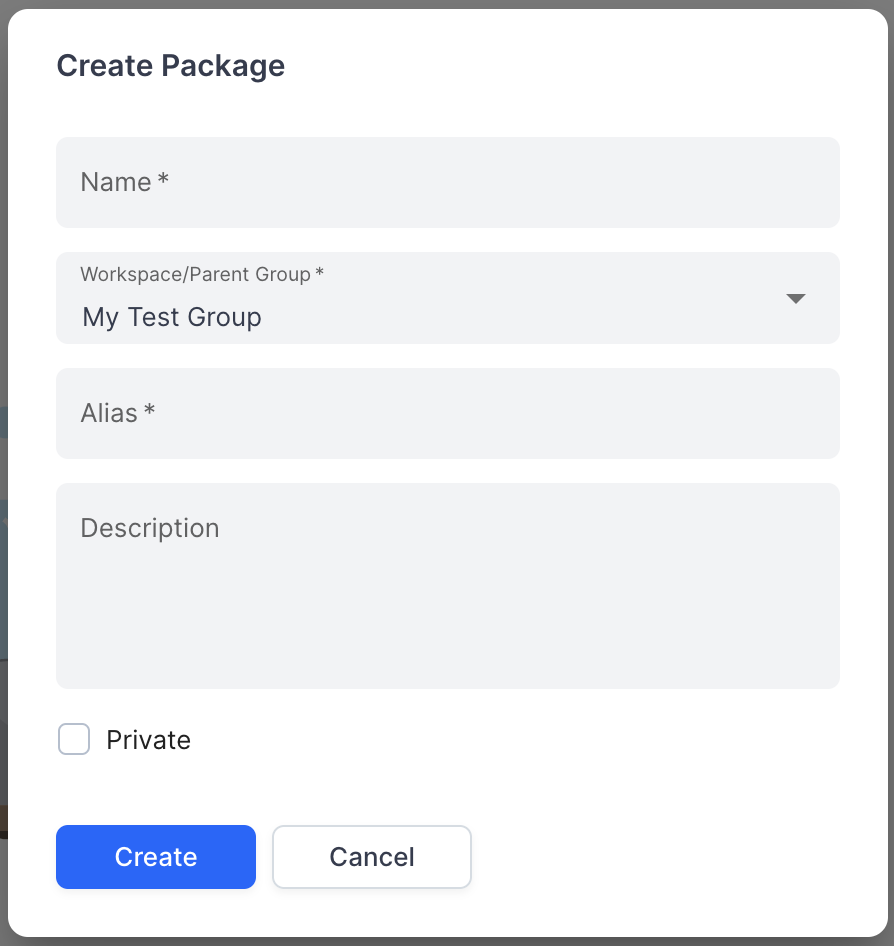
- The system opens Create Package popup with the following fields:
- Name - required field.
- Workspace/Parent Group - required field. By default, the value equals to the current group/workspace. It is
possible to select group only under current workspace.
- API to select group - GET /api/v2/packages:
- kind = group
- showAllDescendants = true
- textFilter = <user input> if user searches group.
- API to select group - GET /api/v2/packages:
- Alias - required field. Alias must be unique within parent group/workspace. If alias is not unique, the system shows the following message when user clicks Create button: “Alias “%s” is already reserved. Please use another alias.”
- Description - short summary for package.
- Private - if checked, then package will be private and by default, will be visible to current user only.
- User clicks Create.
- The system creates new package.
- API to create group - POST /api/v2/packages:
- parentId = <Id of workspace/group under which current package is created>
- kind = package
- name = <user input from Name field>
- alias = <user input from Alias field>
- description = <user input from Description field>
- defaultRole. If Private checkbox is selected, then defaultRole = none. Otherwise, defaultRole = viewer.
- API to create group - POST /api/v2/packages:
- The system opens newly create package.
Screen View
Section titled “Screen View”