Define Release Version Pattern
Design Item ID: DI-Portal-PS-006
Design Item Name: Define Release Version Pattern
Related Design Items: DI-Portal-PS-001: General Settings
Related API:
- Get package by Id (GET /api/v2/packages/{packageId})
- Change the package’s parameters (PATCH /api/v2/packages/{packageId})
Revision History:
| Date | Description |
|---|---|
Description
Section titled “Description”This feature allows the user to define a regular expression (regex) pattern that enforces a specific naming convention for versions in release status. When a user attempts to publish a version in release status, the system validates the version name against the specified regex pattern. If the version name does not match the pattern, an error message is displayed, preventing the release from being published.
Start Point
Section titled “Start Point”- User navigates to APIHUB Portal → specific workspace → specific group → specific package → Package Settings → General tab.
Execution
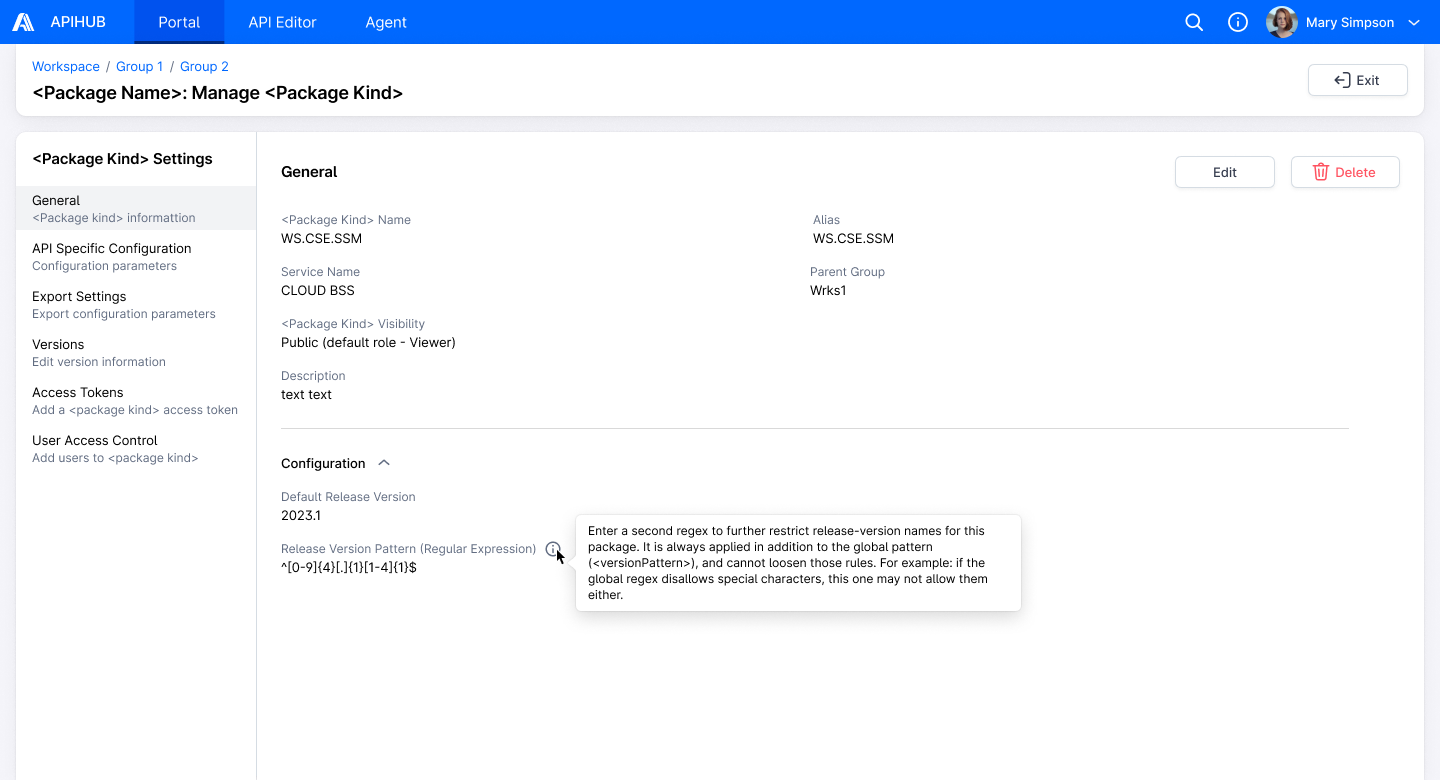
Section titled “Execution”- User hovers over the info icon near the Release Version Pattern field.
- The system displays a tooltip with the following message: “Enter a second regex to further restrict release-version names for this package. It is always applied in addition to the global pattern (<versionPattern>), and cannot loosen those rules. For example: if the global regex disallows special characters, this one may not allow them either.”
- User clicks Edit button.
- The system displays the default regular expression pattern for release version names in the Release Version
Pattern field. Default value: [0-9]{4}.[1]{1}[1-4]{1}$
- API to show package parameters – GET /api/v2/packages/{packageId}
- packageId = current package Id
- API to show package parameters – GET /api/v2/packages/{packageId}
- User enters a custom regex pattern into the “Release Version Pattern” field and clicks Save button.
- Note: The new pattern only affects the validation logic for future version names during the release process; it does not impact existing version names or other stored data.
- The system updates the value of Release Version Pattern field.
- API to update default release version – PATCH /api/v2/packages/{packageId}
- packageId = current package Id
- releaseVersionPattern = value from Release Version Pattern field
- API to update default release version – PATCH /api/v2/packages/{packageId}
Mockups
Section titled “Mockups”