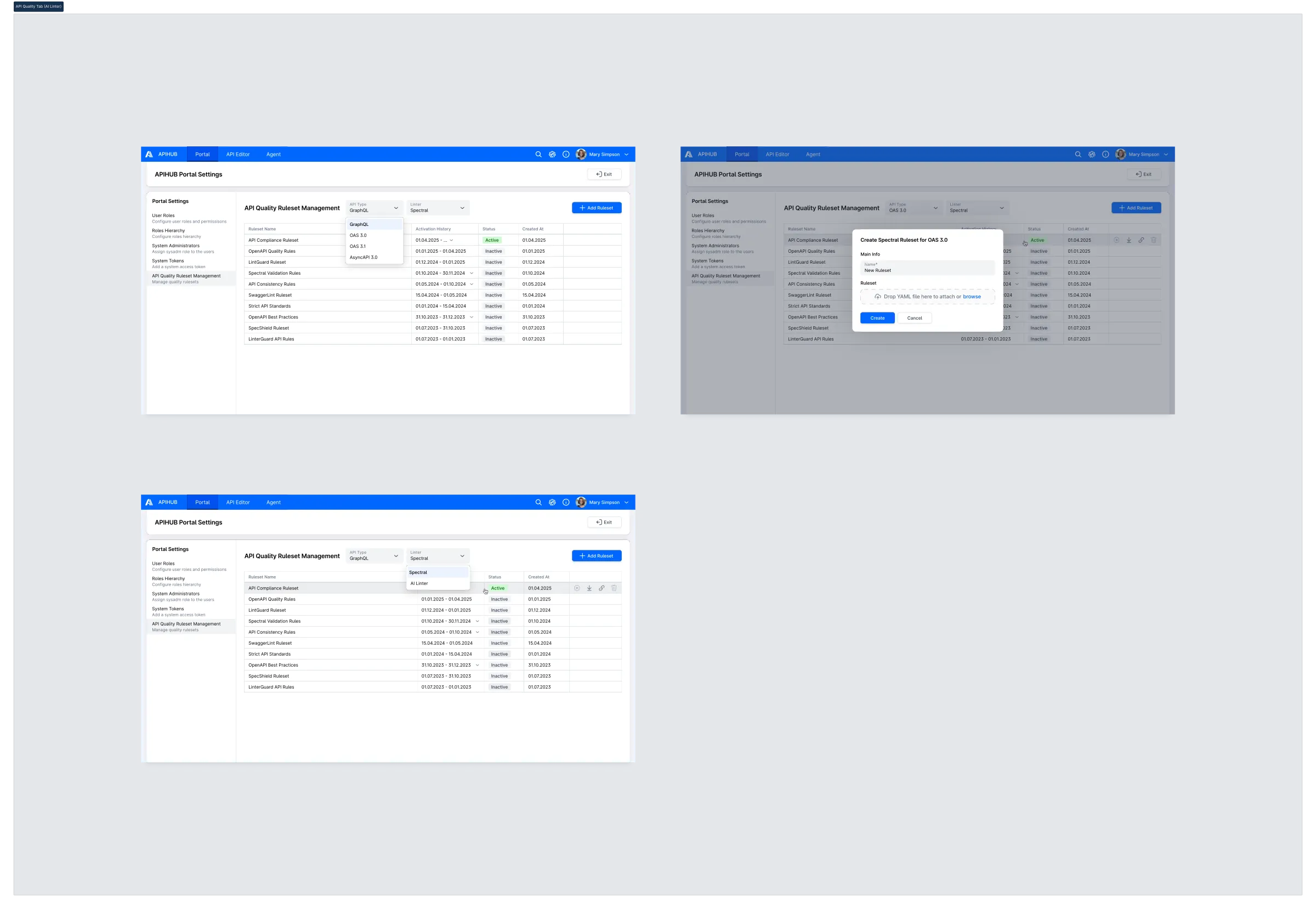
DI-Portal-GS-005 Ruleset Management for API Quality Check
Design Item ID: DI-Portal-GS-005
Design Item Name: Ruleset Management for API Quality Check
Related Design Items:
Related API:
- Get a list of rulesets (GET api/v1/rulesets)
- Create a new ruleset (POST api/v1/rulesets)
- Get ruleset metadata (GET /api/v1/rulesets/{id})
- Delete a ruleset (DELETE /api/v1/rulesets/{id})
- Get activation history for a ruleset (GET /api/v1/rulesets/{id}/activation)
- Activate a ruleset (POST /api/v1/rulesets/{id}/activation)
- Download ruleset file (GET /api/v1/rulesets/{id}/data)
Revision History:
| Date | Description |
|---|---|
| 12.05.2025 | initial version for https://github.com/Netcracker/qubership-apihub/issues/118 / https://github.com/Netcracker/qubership-apihub/issues/117 |
| 10.03.2026 | Updated to support multiple linters (Spectral, AI Linter) per API type. Added Linter dropdown, AsyncAPI 3.0 API type, updated Create Ruleset popup title |
Description
Section titled “Description”This functionality enables system administrators to manage quality rulesets used to lint API specifications and show the result (for more information see API Quality Validation Result) in APIHUB. Linting is performed by the qubership-api-linter-service. The system supports multiple linters per API type. Currently supported linters are Spectral and AI Linter. The system administrator can manage rulesets for each combination of API type and linter. Rulesets are organized by API type (GraphQL, OAS 3.0, OAS 3.1, AsyncAPI 3.0) and by linter (Spectral, AI Linter). When the Linter Service is enabled, a new system user visiting the Ruleset Management tab for the first time will see default out-of-the-box (OOB) rulesets for each supported combination of API type and linter, with one active ruleset per API type per linter. These default rulesets are used automatically to validate all newly published API documents unless the administrator activates different ones.
Assumption
Section titled “Assumption”- The public ruleset URL for Spectral rulesets must end with the .yaml extension to be correctly recognized by Spectral CLI and VSCode extension. If the URL does not end with .yaml, users may encounter an error.
- qubership-api-linter-service always has at least one ruleset and exactly one active ruleset per API type per linter; i.e. there is no state of the service where no rulesets exist or all existing rulesets are inactive for a given API type and linter combination.
Start Point
Section titled “Start Point”- User navigates to APIHUB Portal Settings → API Quality Ruleset Management tab.
Execution
Section titled “Execution”Precondition: qubership-api-linter-service must be enabled. The system verifies if the qubership-api-linter-service is enabled:
- API to check of linter service is enabled - GET /system/info:
- if linterEnabled = true, then it means linter service is enabled.
- If the service is disabled, the Ruleset Management tab is not shown, and the functionality is effectively disabled.
To view list of existing rulesets:
- User clicks API Quality Ruleset Management tab in Portal settings.
- The system opens Ruleset Management page and shows two dropdown selectors in the header:
- “API Type” dropdown — allows the user to select an API type: GraphQL, OAS 3.0, OAS 3.1, AsyncAPI 3.0.
- “Linter” dropdown — allows the user to select a linter: Spectral, AI Linter.
- User selects an API type from the “API Type” dropdown.
- User selects a linter from the “Linter” dropdown.
- The system shows the table of rulesets filtered by the selected API type and linter combination. The table
displays the following columns:
- Ruleset Name - A unique name for the ruleset within the selected API type and linter.
- Activation History - Historical active periods displayed as date ranges.
- The system shows only the latest 100 activation records.
- Status - Current state of the ruleset:
- Active — Currently used for validating newly published API specifications.
- Inactive — Not currently in use; available for activation.
- Created At - Date when the ruleset was created.
- API to show list of all rulesets - GET /api/v1/rulesets. Rulesets in the response are sorted as follows:
- First, active ruleset.
- Second, rulesets with no activation history, sorted by creation date/time in descending order.
- Then, rulesets with activation history, sorted by last activation date/time in descending order.
qubership-api-linter-service provides OOB rulesets which are active by default for each API type and linter combination.
To create new ruleset:
- User clicks [+ Add Ruleset] button while viewing rulesets for a specific API type and linter.
- System opens Create Ruleset popup with a dynamic title following the template: “Create <Linter> Ruleset for <API
Type>”, where <Linter> is the currently selected value in the “Linter” dropdown and <API Type> is the
currently selected value in the “API Type” dropdown (e.g., “Create Spectral Ruleset for OAS 3.0”, “Create AI Linter
Ruleset for AsyncAPI 3.0”). The popup contains:
- Main Info section:
- Name (required field)
- Ruleset section:
- Ruleset File (required field) — a drag-and-drop area with text “Drop YAML file here to attach or browse” that allows the user to select a YAML file from local filesystem.
- Main Info section:
- User fills the required fields and clicks Create button.
- System creates new ruleset. New ruleset has Inactive status.
- API to create new ruleset - POST /api/v1/rulesets
- System shows the newly created ruleset in the Ruleset Management table for the current API type and linter view.
To activate a ruleset:
- User hovers over ruleset in Active status.
- The system shows disabled Activate button and shows tooltip on button hover: “The ruleset is already active”.
- User hovers over ruleset in Inactive status and clicks Activate button.
- System displays a confirmation dialog with the message: “Activating this ruleset will automatically deactivate the currently active one. Do you want to proceed?”
- User clicks the [Proceed] button in the confirmation dialog to confirm.
- System sets the chosen ruleset status to “Active”, automatically changing the status of the previously active ruleset
(for the same API type and linter) to “Inactive”.
- API to activate the selected ruleset - POST /api/v1/rulesets/{id}/activation.
- System refreshes the page and shows updated state of rulesets.
To delete a ruleset:
- User hovers over an ruleset from the ruleset list.
- The system checks if the ruleset can be deleted:
- API to check if the ruleset can be deleted - GET /api/v1/rulesets:
- if canBeDeleted = false, then it cannot be deleted. There are two criteria that must be met delete ruleset:
- ruleset is in inactive status AND
- currently no package version revision exists that was validated against this ruleset
- if canBeDeleted = false, then it cannot be deleted. There are two criteria that must be met delete ruleset:
- API to check if the ruleset can be deleted - GET /api/v1/rulesets:
- If the ruleset cannot be deleted and its current status is active, the system disables Delete button and show the following tooltip on button hover: “Active ruleset cannot be deleted”
- If the ruleset cannot be deleted and its current status is inactive, the system disables Delete button and show the following tooltip on button hover: “The ruleset cannot be deleted due to existing versions that have been validated against this ruleset”.
- If the ruleset can be deleted, then user clicks the [Delete] button.
- The system displays a confirmation prompt: “Delete ruleset?”
- User clicks the [Delete] button in the confirmation dialog to confirm the deletion.
- The system deletes the selected ruleset.
- API to delete ruleset - DELETE /api/v1/rulesets/{id}:
- <id> - id of the selected ruleset.
- API to delete ruleset - DELETE /api/v1/rulesets/{id}:
To download a ruleset original file:
- User hover over a ruleset from the Ruleset Management table.
- User clicks [Download] icon.
- System downloads the original YAML ruleset file to the user’s local machine.
- API call to retrieve the original ruleset file - GET /api/v1/rulesets/{id}/download
- inlineContent = false
- <id> - id of the selected ruleset
- API call to retrieve the original ruleset file - GET /api/v1/rulesets/{id}/download
To get public link to ruleset (inline content):
- User hover over a ruleset from the Ruleset Management table.
- User clicks [Copy Public URL] icon.
- The system (client) generates a public URL according to the following format:
“https://<current_server>/api/v1/rulesets/{id}/download”, where <id> is id of current ruleset.
- API to access ruleset file content - GET /api/v1/rulesets/{id}/data
- inlineContent = true
- <id> - id of the selected ruleset
- API to access ruleset file content - GET /api/v1/rulesets/{id}/data
Security
Section titled “Security”- UI for ruleset management is available only for system administrator user.
- API for ruleset creation, activation, deletion are available only for system administrator user.
- API to download ruleset / get public link to ruleset is public API without any authorization.
Mockups
Section titled “Mockups”