APIHUB Backend database structure (ERD)
This article depicts tables and relationships in APIHUB Backend database.
This article contains static pictures for reference.
Interactive document can be found here: ERD on GitHub pages
Relationships tables
Section titled “Relationships tables”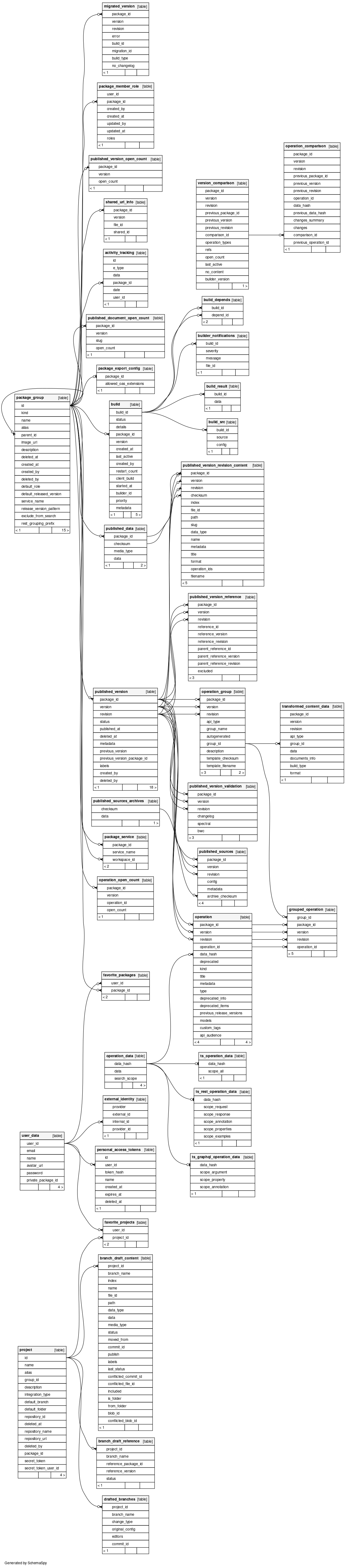
Orphans tables
Section titled “Orphans tables”
Appendix: how to generate dynamic document
Section titled “Appendix: how to generate dynamic document”The following tool is used: SchemaSpy, GitHub
Run SchemaSpy from jar distribution (on Windows)
Section titled “Run SchemaSpy from jar distribution (on Windows)”Software prerequisites:
- JRE
Steps:
- Download jar file from Release v6.2.4
- Download PG JDBC driver from Release 42.7.7
- Put both jars to same folder
You need PG with APIHUB Backend database up and running. For example you could set up APIHUB via docker-compose or in local k8s cluster and make port-forward.
Let’s imagine PG is available on localhost:5432
Just execute the following command:
java -jar schemaspy-6.2.4.jar ^ -t pgsql ^ -dp postgresql-42.7.7.jar ^ -host localhost ^ -port 5432 ^ -db apihub_backend ^ -u postgres ^ -p postgres ^ -s public ^ -o erd ^ -vizjs ^ -norows ^ -noimpliedResults will be placed in ./erd