DI-Portal-PKGVER-023 Export Document from Package Version
Design Item ID: DI-Portal-PKGVER-023
Design Item Name: Export Document from Package Version
Related Design Items:
Related API:
- Get file data (GET /api/v2/packages/{packageId}/versions/{version}/files/{slug}/raw)
- Async export of version, document or operations group (POST /api/v1/export)
- Get status of async export (GET /api/v1/export/{exportId}/status)
Revision History:
| Date | Description |
|---|---|
| 12.03.2025 | 1) Initial version. 2) Export OAS specifications without OAS extensions (https://github.com/Netcracker/qubership-apihub/issues/73, https://github.com/Netcracker/qubership-apihub/issues/65) |
Description
Section titled “Description”The functionality provides a user to export any document from package version.
Start Point
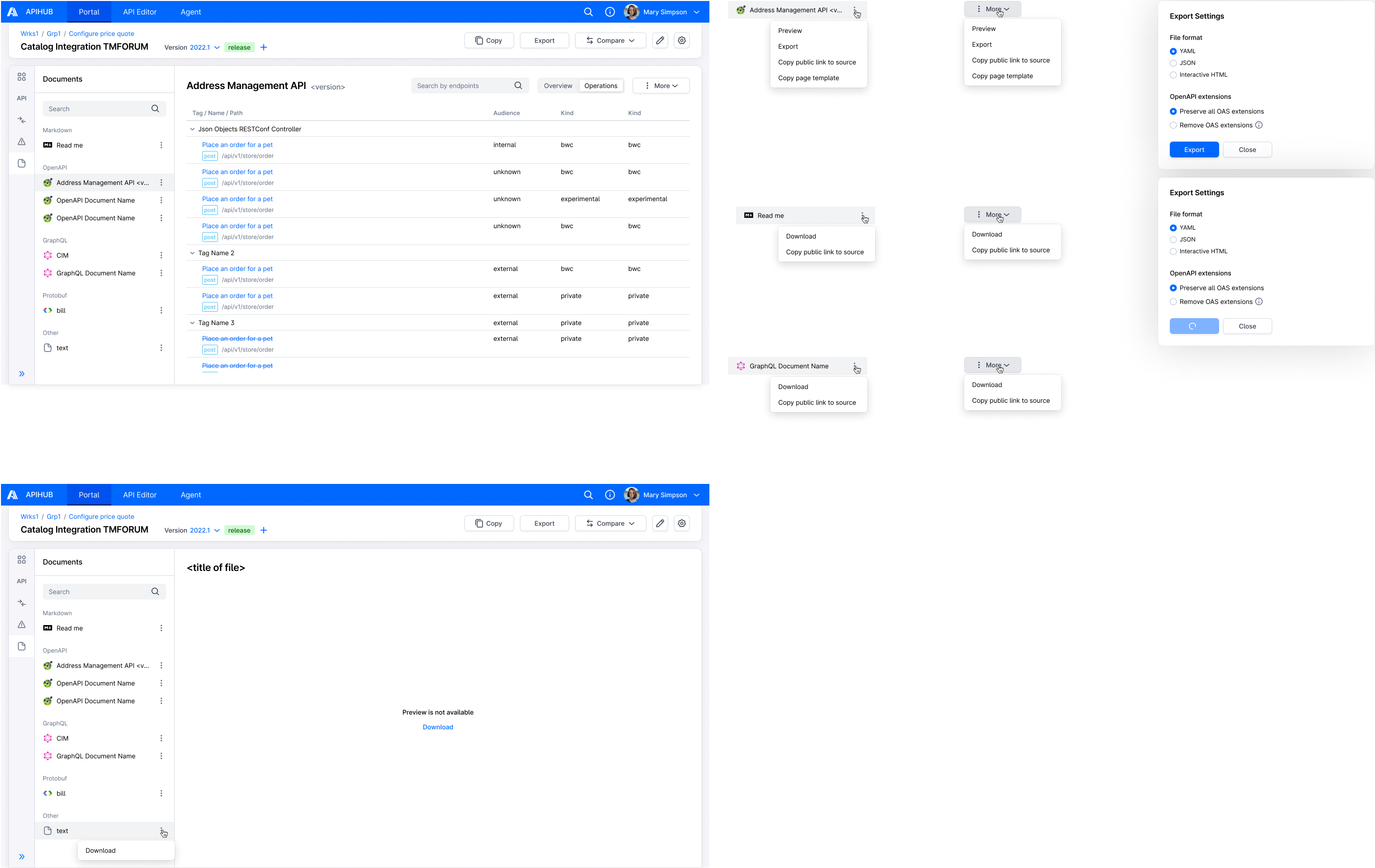
Section titled “Start Point”- User navigates to APIHUB Portal → workspace → group → package version -> documents tab
Execution
Section titled “Execution”- For OpenAPI specification document (document type = openapi-3-1, openapi-3-0, or openapi-2-0)
- User clicks action icon near document and selects Export OR user selects document, clicks More button and selects Export under Preview.
- The system opens Export Settings popup.
- User hovers over info icon for “Remove OAS extensions” option.
- The system shall show tooltip:
- if there is least one allowed OAS extension defined on the package: “All extensions will be removed from the
specifications except for the following: <ext 1>, <ext 2>, …, <ext N>”.
- in tooltip the system shows only unique list of extensions.
- if there is no OAS extension defined on the package “All extensions will be removed from the specifications because no allowed list of extensions is defined for the package.”
- ===
- API to get allowed list of OAS extensions for tooltip: GET /api/v1/packages/{packageId}/exportConfig
- if there is least one allowed OAS extension defined on the package: “All extensions will be removed from the
specifications except for the following: <ext 1>, <ext 2>, …, <ext N>”.
- The system exports file.
- API to export version:
- start export process - POST /api/v1/export:
- packageId = <current package id>
- version = <current version>
- documentId = <id of current document>
- format = <format selected by the user in Export Settings popup>
- removeOasExtensions:
- true if user selected “Remove OAS extensions” option
- false if user selected “Preserve all OAS extensions” option
- get export status / resulting file - GET /api/v1/export/{exportId}/status:
- exportId = <export process id returned in POST /api/v1/export>
- start export process - POST /api/v1/export:
- API to export version:
- For Markdown document (document type =
markdown)- User clicks action icon near document and selects Export OR user selects document, clicks More button and selects Export.
- The system exports file.
- API to export file - GET /api/v2/packages/{packageId}/versions/{version}/files/{slug}/raw
- For GraphQL document (document type = graphql or introspection)
- User clicks action icon near document and selects Export OR user selects document, clicks More button and selects Export.
- The system exports file.
- API to export file - GET /api/v2/packages/{packageId}/versions/{version}/files/{slug}/raw
- For all other documents (for document types which are mentioned points 1-3):
- User clicks action icon near document and selects Export OR user selects document and clicks Export (under “Preview is not available” message).
- The system exports file.
- API to export file - GET /api/v2/packages/{packageId}/versions/{version}/files/{slug}/raw
Security
Section titled “Security”User must have “read” permission for the package to export document from the package version.
Mockups
Section titled “Mockups”